What it does
For each keyword you add, the Rank Tracker searches Amazon and records where the ASIN appears in the organic results on page 1. Sponsored placements are excluded. The depth is the whole results page Amazon returned; an ASIN past it is recorded as “not on page 1”, which is a data point, not an error.
Every scan uses the same method, so week-over-week changes are comparable.
Who it is for
Sellers who want to know whether their listing and PPC work is moving organic rank on the phrases that drive revenue: category terms, keywords you bid on, proven winners from the Search Query Audit. You can also track a competitor’s ASIN.
What you need
- A 10-character ASIN, yours or a competitor’s.
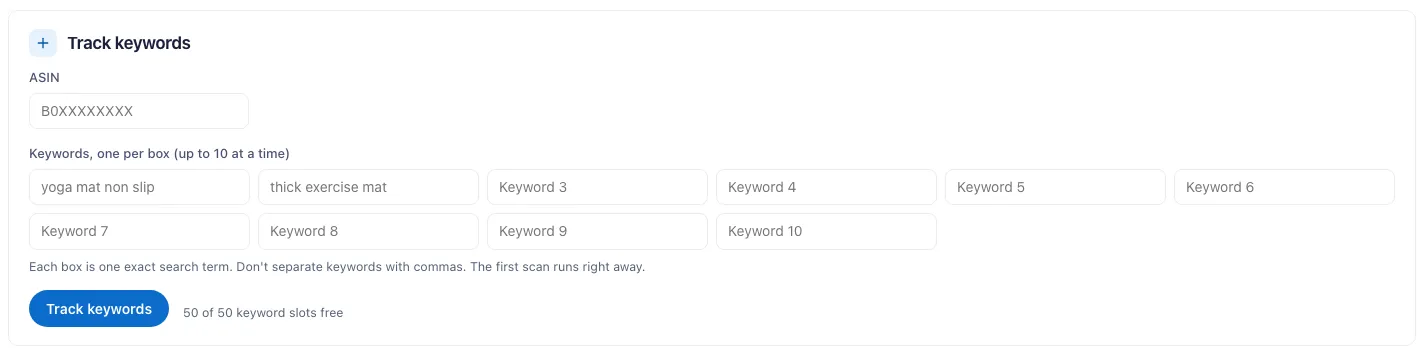
- Up to 10 keywords per add. Each keyword is 2 to 120 characters.
- No Seller Central or Ads connection. Rank tracking runs on our side.
Step by step
- Open the Rank Tracker from the Tools menu.
- Enter the ASIN and up to 10 keywords, then add them.
- Read the first scan. Each keyword is scanned right away, so the trend line starts today.
- Check back each week. Weekly scans run every Monday (03:00 UTC).
- Expand a keyword to see the organic top 10 and the “bought in past month” figure Amazon shows for each.
- Act on movement. Rising terms are working. Falling terms need listing or PPC work. Delete a keyword to free its slot for another.
What you get
- Current organic page-1 position, or “not on page 1”.
- Change against the last scan. “Dropped off page 1” is called out.
- Best position over the last 8 scans, and recent history.
- The top products holding the positions above you.
- The organic top 10 for the keyword, each with the “bought in past month” figure Amazon displays, plus a summary.
- Tracked keywords also feed the Keyword Hub, next to your Ads and search-funnel data.
Plans & limits
| Free trial (14 days) | Pro | Brand | Enterprise | |
|---|---|---|---|---|
| Tracked keywords (at a time) | 5 | 25 | 50 | 100, shared across your stores |
| Keywords per add | 10 | 10 | 10 | 10 |
| Scan cadence | At add time + weekly | At add time + weekly | At add time + weekly | At add time + weekly |
The cap counts keywords tracked at the same time, not a lifetime total. Deleting a keyword frees the slot immediately. Weekly scans run only while you have an active plan or trial.
Common questions
How are positions measured?
Organic page-1 position from live Amazon search results, sponsored placements excluded. Not being on page 1 is recorded too. Every scan uses the same method.
How often do scans run?
Once when you add the keyword, then weekly. The weekly scan runs Monday at 03:00 UTC.
Why is the change against last week blank?
If two scans ran from different delivery ZIP codes, the change between them is not shown. The positions are not comparable.
Do I need to connect my Amazon account?
No. You can track any ASIN, including competitors.
Does the Rank Tracker measure Alexa or AI-assistant visibility?
No. It covers organic search position only. Simulated Alexa for Shopping answers are a separate tool, the AEO Tracker.