What it does
Every line in the P&L is a transaction Amazon posted to your account. The dashboard reads them through your seller connection and sorts them into lines:
- Revenue and refunds: product sales, shipping and gift-wrap credits, promotional rebates, and refunds.
- Selling and FBA fees: referral and fulfillment fees, per SKU.
- Storage and service fees: FBA inventory fees, subscription fees, deal and coupon fees.
- Advertising charges: Ads charges deducted from your Amazon balance, on the day they posted. Ads paid by credit card are not included.
- Reimbursements: adjustments, including Amazon reimbursements, added back.
- Product cost: the one number Amazon does not have. You enter it.
A transaction type the dashboard does not recognize goes to an “other” line, so totals still add up.
Who it is for
Amazon sellers who want profit per SKU after every Amazon fee, without exporting reports. If you sell in more than one currency, each currency gets its own P&L, plus an all-markets view in USD at reference rates, labeled indicative.
What you need
- Your Amazon Seller account, connected once on the Connections page. The dashboard only reads transactions; it changes nothing in your account.
- Optional: each SKU’s product cost, per marketplace, in that marketplace’s currency. Without it, a SKU shows proceeds after fees, before product cost.
Step by step
- Connect your Seller account on the Connections page.
- Open Profit Dashboard and pick a report window: 30, 60, 90, 180 or 365 days.
- Press Sync from Amazon. Longer windows take longer; 365 days can take several minutes. Each report uses one from your plan.
- Read the P&L for the account, then the per-SKU table.
- Type each SKU’s product cost into the table. Net profit and margin update as you type. Costs are saved for every future report.
- Open a past report from Past reports at any time. Opening one does not use your quota.
What you get
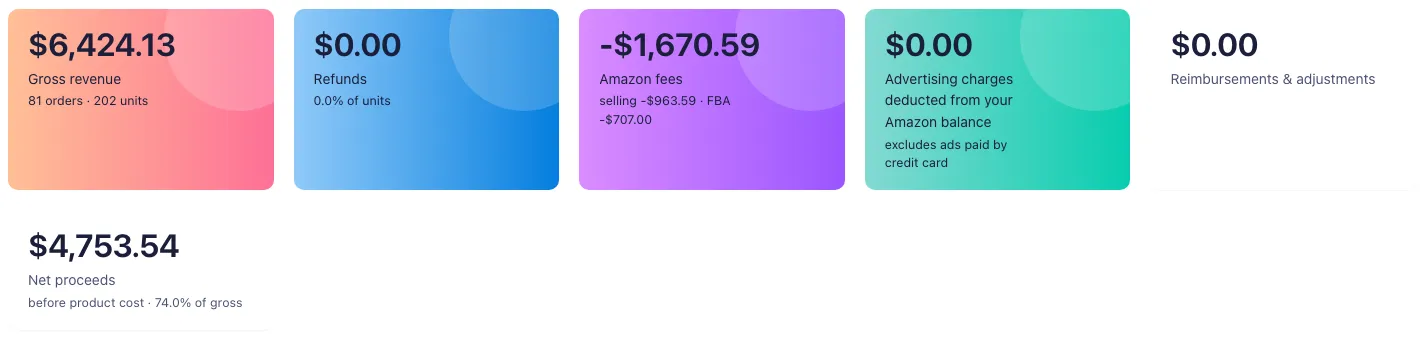
- An account P&L: gross revenue, refunds, selling, FBA and storage fees, advertising charges with TACOS on those charges, service fees, reimbursements, net proceeds and margin.
- A per-SKU table: units, revenue, fees, refund rate and cash result.
- Net profit per SKU once you add product costs: proceeds after Amazon fees, minus product cost on net units sold.
- An AI diagnosis of where margin goes: fee-heavy SKUs, refund-heavy SKUs, and SKUs that lose cash before product cost.
Plans & limits
| Free trial (14 days) | Pro | Brand | Enterprise | |
|---|---|---|---|---|
| Profit reports | 1 for the whole trial | 10 per billing period | 30 per billing period | 100 per billing period, shared across your stores |
| Sync from Amazon | Yes | Yes | Yes | Yes |
| Nightly transaction sync | Yes | No | Yes | Yes |
| Ads spend by SKU | Yes | No | Yes | Yes |
Editing product costs never uses quota. Reports have their own quota, separate from every other tool.
On Brand and in the trial, your transactions also sync every night. Reports covering up to 180 days are then built from the synced rows. On Pro, every report pulls its window when you press Sync from Amazon, and Ads spend is not split by SKU.
Common questions
Why does my Ads line differ from Ads console spend?
The P&L counts Ads charges on the day Amazon deducted them from your balance, not Ads spend on the day the ads ran. Ads paid by credit card are not in it.
Do I enter product costs for every report?
No. Enter each SKU’s cost once per marketplace. It is saved and used on every report you open.
Is my transaction data stored?
Reports keep the computed P&L, the per-SKU rollup and your saved product costs. Transactions pulled by Sync from Amazon are not kept. The nightly sync on Brand keeps the rows it pulls, so reports build without pulling again.
Does a report use quota if I open it again?
No. Only building a new report uses one. Past reports stay readable.
What does indicative mean on the USD view?
Sales in other currencies are converted to USD at reference rates for the day they posted. Each currency’s own P&L stays exact in that currency.