What it does
The planner pulls one report from your connected account: FBA Manage Inventory Health. It carries available and inbound stock, units shipped over the last 7, 30, 60 and 90 days, inventory age, and Amazon’s storage and aged-inventory fee estimates.
For each SKU it works out:
- Sales velocity: units shipped in the last 30 days. If that is zero, the last 90 days, then the last 7.
- Days of supply: Amazon's Total Days of Supply from the same report, which counts units in open shipments. We read it; we do not compute it.
- Status: reorder now when days of supply is at or below lead time plus a safety buffer; reorder soon within 30 days beyond that; overstock above 180 days.
- Suggested quantity: Amazon's Recommended ship-in quantity from the same report. We read it; we do not compute it. Amazon works it out from its own forecast and lead time, not the lead time you set, so a SKU can show reorder soon with 0 units. A blank shows as “—”.
The safety buffer is 14 days, or 28 for products in launch mode. Set the mode for the account on your Seller profile, or per product on the Products page. A number Amazon leaves blank in the report makes that SKU unknown, never zero.
Who it is for
FBA sellers deciding what to reorder this week and what to clear before storage fees stack up.
What you need
- Your Amazon Seller account, connected once on the Connections page. The planner only reads the report; it changes nothing in your account.
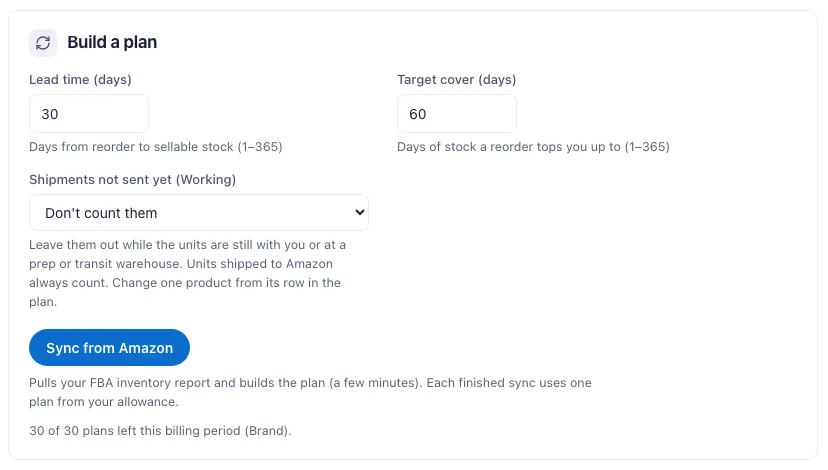
- Your supplier lead time and the stock cover you want after a reorder. Defaults: 30 and 60 days.
- A choice for shipments created in Seller Central but not sent yet (Working): count them or not. By default they do not count. Units shipped to Amazon always count.
Step by step
- Connect your Seller account on the Connections page.
- Open Inventory Planner and set lead time, 1 to 365 days. It sets the reorder lines; the suggested quantity is Amazon’s.
- Press Sync from Amazon. The report takes a few minutes. Each finished sync uses one plan from your allowance.
- Work the reorder list first. Reorder-now SKUs come first, with a suggested quantity.
- Check overstock and aged units. Overstocked SKUs with aged units are the ones to clear with price cuts, deals or removal orders.
- Mark what you ordered. The reorder flag moves to Ordered, then to In transit once a sync shows the units inbound.
What you get
- A per-SKU plan: velocity, Amazon's days of supply, status, suggested reorder quantity and order-by window.
- Aging and fees: units aged 181+ days, Amazon’s projected aged-inventory surcharge, and next month’s storage estimate.
- An AI action list ranked by severity: what to reorder, what to clear and how.
- Draft purchase orders from the SKUs you tick, one per supplier. You send them; we never contact suppliers.
Plans & limits
| Free trial (14 days) | Pro | Brand | Enterprise | |
|---|---|---|---|---|
| Inventory plans | 1 for the whole trial | 10 per billing period | 30 per billing period | 100 per billing period, shared across your stores |
| Sync from Amazon | Yes | Yes | Yes | Yes |
| Daily inventory scan and alerts | Yes | No | Yes | Yes |
Past plans stay readable without using quota. Inventory plans have their own quota, separate from every other tool.
The daily scan emails you the day a SKU crosses into a risk state: heading for a stockout, overstocked, facing aged-inventory fees, or stranded. A SKU already in that state when you connect does not trigger an email; the first scan sets the baseline.
Common questions
Why is a SKU marked unknown?
Amazon left the units-shipped number or the days of supply blank in the report. The planner does not read a blank as zero and does not compute its own days of supply, so that SKU gets no status until Amazon fills the number in. The suggested quantity is Amazon’s own and shows whenever Amazon gives one.
Do I need to export a report?
No. The planner pulls the report through your seller connection. The raw report is analyzed and discarded, never stored.
Can I set a different lead time per product?
Yes, on the Products page. A product setting wins over the account setting.
Does the planner create shipments in Seller Central?
No. It only reads your inventory report. Shipments stay your call in Seller Central.