Short version: Review Requests is a new Amazon Ads product, in US beta since November 2026. A "How was your item?" card asks shoppers who already bought your product to rate it, and you pay only when one leaves a rating or review. On an account we manage, the console would not take a default bid under $2.00. Only products with fewer than 1,000 reviews qualify. It is not the free Request a Review button, and it does not replace Vine.
Amazon added Review Requests to the Amazon Ads API on November 16, 2026. Amazon's overview says it places a native "How was your item?" card on Amazon's highest-traffic pages and invites a verified purchaser to write a review. This page covers where the tab sits in the ads console, what it costs, who qualifies, and how it compares with the two review tools sellers already use.
Where to find Review Requests in the ads console
The path takes three clicks. We took these screenshots on an account we manage, on 2026-11-17.
- Create campaign, then See all campaign types. The first dialog shows Sponsored Products, Sponsored Brands, DVA+ and Full-Funnel Campaigns. Review Requests is not on it.
- Sponsored ads, then the Review Requests tab. It is the last tab, after Products, Sponsored Brands, Amazon Business and Across retailers. Click Create campaign.
- Set the default bid. Targeting is automatic. The console says Amazon will target past purchasers of your products. A bid under $2.00 is rejected.
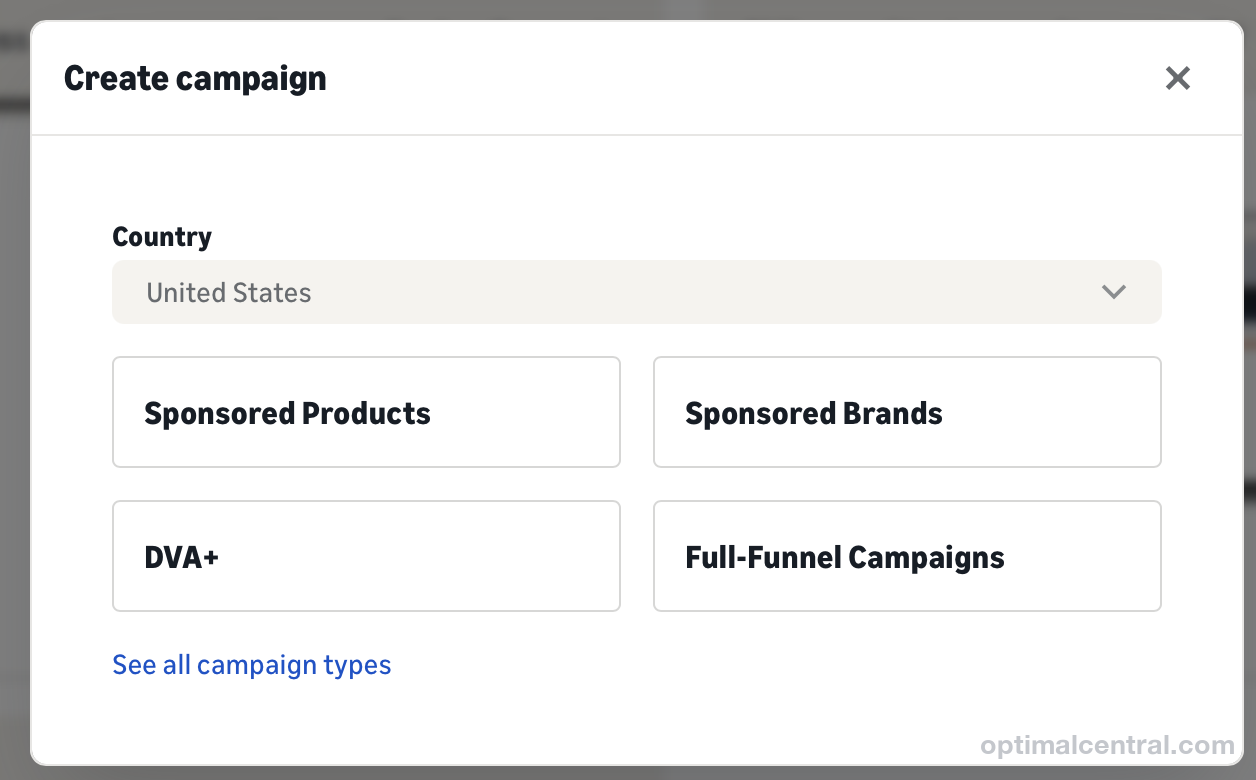
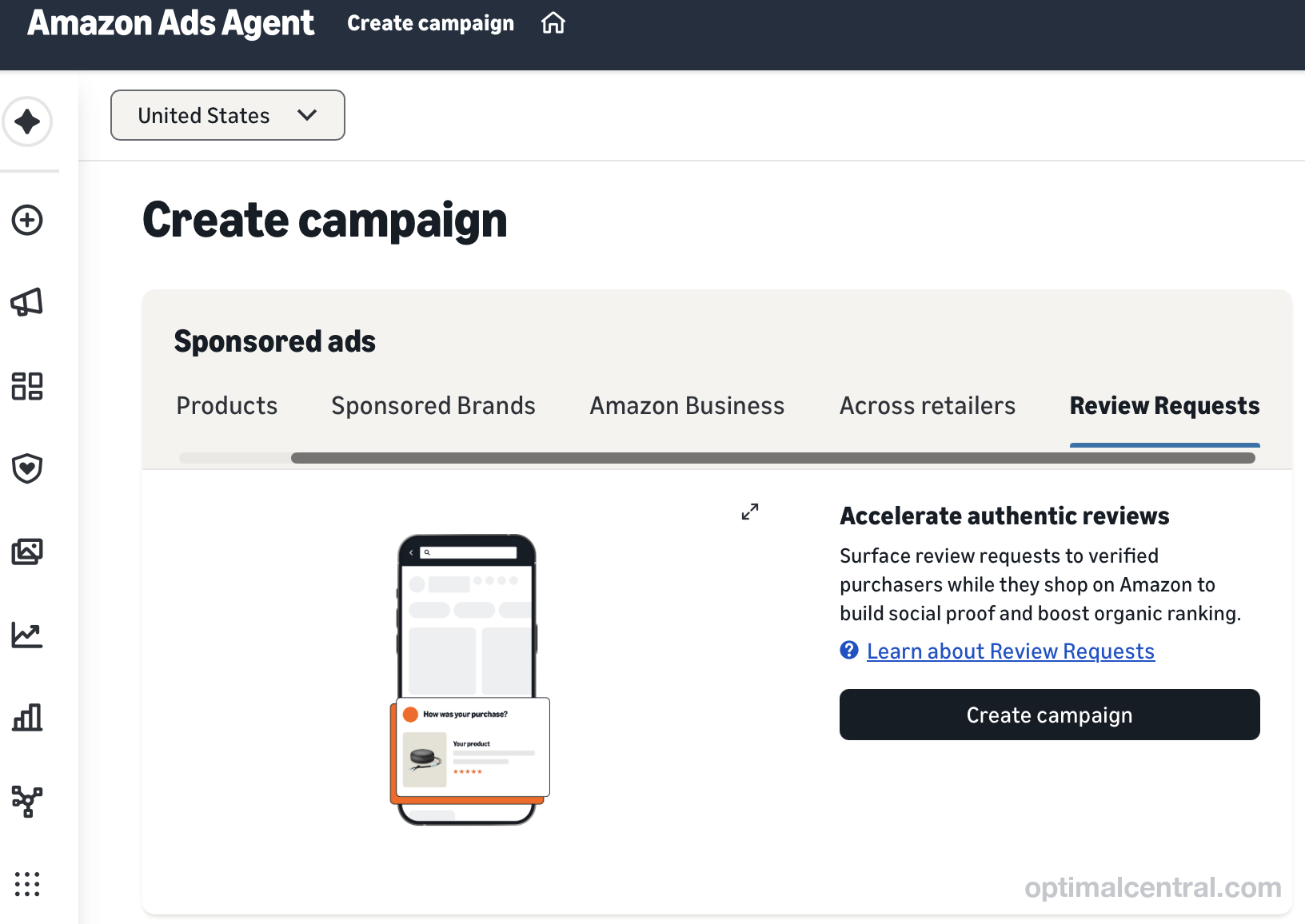
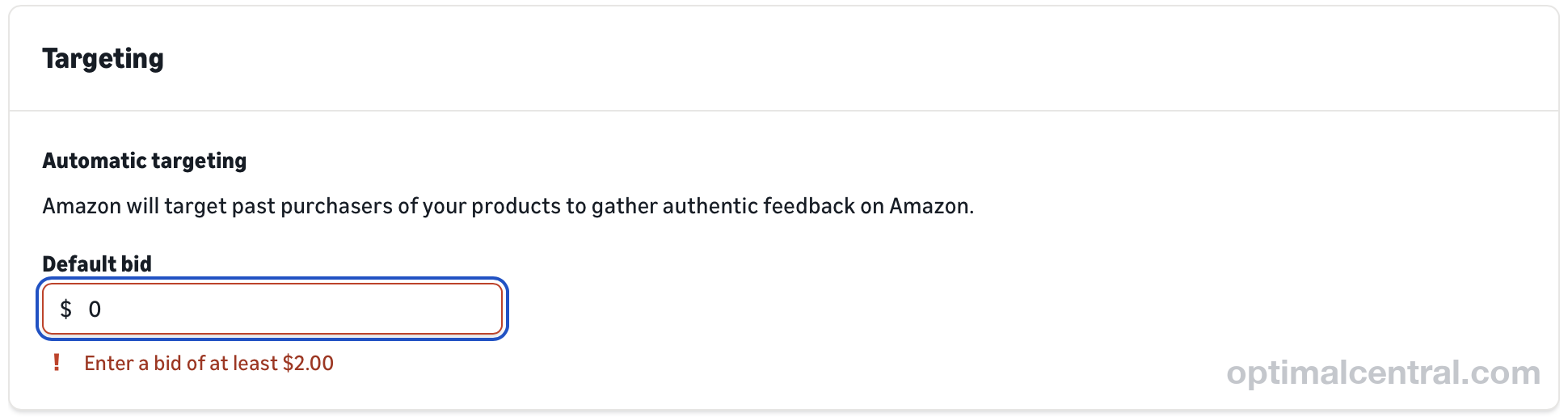
If the tab is not there, your account is not in the beta yet. Amazon's getting-started guide says that during the beta, Review Requests is enabled per advertiser account.
What it costs
You pay per rating or review, not per view. Amazon's Review Requests FAQ calls the billable click "a shopper leaving a rating or review on the card". There is no charge for impressions, or for shoppers who see the card and leave nothing.
- Bid: the most you pay for each rating or review. Our console set the floor at $2.00. Amazon's pages do not publish a minimum.
- Daily budget: the cap on what you spend in a day.
- A star rating alone is billable. The shopper does not have to write text.
One number to treat with care: the API guide's example request uses a $0.75 bid. That is an example in a code sample. We have not tested whether the API accepts a bid under $2.00.
Who qualifies
- Marketplace: the United States only, during the beta.
- Products: fewer than 1,000 total reviews. Amazon's overview says eligibility is checked when the campaign is created and while it runs. Ads for a product pause on their own once it reaches 1,000 reviews.
- Sellers and vendors: both. The FAQ says both supply the ASIN, and a SKU is not required.
- One ASIN per ad. The ad's action settings are fixed once it is created, so you create one ad for each ASIN.
Review Requests vs Request a Review vs Vine
Three Amazon tools ask for reviews. They reach different people at different prices.
| Review Requests (ad) | Request a Review | Amazon Vine | |
|---|---|---|---|
| What you pay | Your bid per rating or review left on the card, up to a daily budget. $2.00 minimum bid on an account we manage. | Nothing. | Sellers: $0 for 1 to 2 units, $75 for 3 to 10, $200 for 11 to 30, per parent ASIN, plus the units. Vendors: $1,750 per parent ASIN for up to 30 units. |
| Who is asked | Shoppers who bought and received the product. | The buyer of one order. | Vine Voices, who get the product free. |
| How they are asked | A "How was your item?" card on Amazon pages. | Amazon's email. | Vine Voices request enrolled products. |
| When | While the campaign runs. | Once per order, 5 to 30 days after delivery. | After enrollment. |
| Needs past sales | Yes. | Yes. | No. |
| Product limit | Fewer than 1,000 reviews. | None stated. | Fewer than 30 reviews, Brand Registry, active FBA listing. |
Sources: Request a Review timing from an Amazon staff post on the Seller Forums. Seller Vine fees from Amazon's Vine enrollment fee page, which says the fee is billed once a Vine review arrives and does not depend on how many reviews come in. Vine eligibility from Amazon's Vine help page. The vendor Vine fee is the rate shown in Vendor Central. Both Seller Central pages need a login.
The table hides one difference that matters most for a launch. Vine puts free units in reviewers' hands, so it works before you have buyers. Review Requests and Request a Review only reach people who already bought.
Should you bid more than $2.00?
Work out what a rating is worth to you before you pick a bid. Run these four steps for one ASIN.
- Count your buyers who have not rated. Orders in the last 30 days minus new ratings in the last 30 days. Review Requests can only reach people who bought.
- Set a cost-per-rating ceiling. Compare it with what you pay now. On Vine, divide the fee plus the cost of the units by the reviews you expect.
- Start at the floor. Bid $2.00 with a daily budget you can lose for two weeks.
- Measure cost per new rating. Spend in the period divided by the change in your rating count. Raise the bid only if spend stays under budget every day and the cost per rating is below your ceiling.
Vine, as a seller: a $200 fee for 30 units, plus 30 units at a $12 landed cost ($360). That is $560 for up to 30 Vine reviews, with no promise all 30 arrive.
Review Requests at a $2.00 bid: 30 ratings or reviews cost at most $60. Some will be star ratings with no text.
The $12 unit cost is an example. Use your own. The Review Requests figure is a ceiling: it assumes every rating is billed at the full bid.
What Review Requests can't tell you yet
- No review counts in the reporting API. Amazon's FAQ says the reporting API returns impressions, clicks, click-through rate, spend and cost per click today. Review metrics are in the ads console. Review-specific API metrics are due "in a later beta update".
- No targeting choices. There is no keyword or audience targeting. The API requires one fixed target on each ad group, but Amazon says it is a required value, not a targeting option.
- No say over who is asked or what they rate. The FAQ says advertisers cannot pick shoppers or influence the star rating. Every submission falls under Amazon's Community Guidelines. A bad product will collect bad ratings faster.
- It doesn't solve zero sales. A product nobody has bought has no one to ask.
- Overlap with Request a Review is not documented. Amazon does not say whether a buyer who got the Request a Review email can also see the card. We don't know.
A launch checklist
- Check that the Review Requests tab appears on your account.
- List your ASINs with fewer than 1,000 reviews and at least some sales in the last 30 days.
- Read the last 20 one- and two-star reviews on each first. Fix the cause before you pay for more ratings. See what can and cannot be removed.
- Keep sending the free request for every order. See how to request a review on Amazon.
- Note today's rating count for each ASIN, so cost per new rating can be worked out in two weeks.
How many ratings page-one listings carry: we checked 492 top-10 listings.
Send Amazon's request on every eligible order
Review Requests is paid. Request a Review costs nothing. OptimalCentral is software that flags wasted Amazon ad spend, shows your real profit after every Amazon fee, and finds the FBA reimbursements you can claim back, with a 14-day free trial. On the Brand plan, Brian sends Amazon's free request to every eligible order once a day, after a one-time authorization: see Auto Review Request. It does not create Review Requests ad campaigns. Any change to bids or budgets in your ad account needs your approval, item by item.
Start free trial →Part of the series: stage 4 of 5 (Reviews) in our guide to optimizing an Amazon listing. Next: Read click-through rate.
Frequently asked questions
What is Amazon Review Requests?
An Amazon Ads product in US beta. It shows a "How was your item?" card to shoppers who already bought and received a product. You pay only when a shopper leaves a rating or review on that card.
Where do I find Review Requests in the Amazon Ads console?
Create campaign, then See all campaign types, then the Review Requests tab under Sponsored ads. Amazon turns the beta on one advertiser account at a time, so the tab may not appear on yours.
What is the minimum bid for Amazon Review Requests?
On an account we manage, on 2026-11-17, the console rejected a lower default bid with "Enter a bid of at least $2.00". Amazon's pages do not publish a minimum.
Is Review Requests the same as the Request a Review button?
No. Request a Review is free and sends Amazon's email once per order, 5 to 30 days after delivery. Review Requests is a paid ad that charges per rating or review left on its card.
Which products qualify for Review Requests?
US products with fewer than 1,000 total reviews. The ad pauses on its own once a product reaches 1,000.